
Complete Guide to EDGAR Filing Codes: CIK, CCC, Passphrase & EDGAR Next
The Electronic Data Gathering, Analysis, and Retrieval (EDGAR) system is the backbone of SEC filing in the United States. Every public company, mutual fund, and insider required to submit filings like Form 10-K, Form D, or Form S-1 must do so electronically via EDGAR. To access and use this system securely, filers must be authenticated using a set of unique EDGAR filing codes.
These codes not only verify a filer’s identity, but also authorize secure access to the EDGAR Filer Management portal and enable activities like password resets, access updates, or delegating permissions. As the SEC transitions toward EDGAR Next, a modernization initiative that introduces Login.gov-based access and enhanced role-based permissions, understanding how these codes work—and how to manage them—has never been more critical.
This guide will explain each EDGAR code, show how they function under both the current and upcoming systems, and walk users through the step-by-step enrollment and code management process to support a truly visual learning experience. Whether you’re a first-time filer or updating your access for EDGAR Next, this page will ensure you’re well-prepared and compliant.
Get Started
Existing Filers:
Submit this form to reset your existing EDGAR codes and/or enroll in EDGAR Next
New Filers:
Submit the Form ID to apply for an EDGAR account and new codes for the appropriate entity
What Are the Core EDGAR Access Codes?
To file with the SEC through EDGAR, each registrant is issued a set of unique codes that serve to authenticate their identity and authorize electronic submissions. Below is a breakdown of the current codes in use and how their roles are changing under EDGAR Next, the SEC’s modernization initiative going into effect in September 2025.
1. CIK (Central Index Key)
The CIK is a permanent, public identifier assigned to every filer by the SEC. It uniquely identifies companies and individuals in the EDGAR system and appears in all submission headers.
- It is not confidential and is used in combination with other codes to authorize actions
- The CIK never expires and remains unchanged even after EDGAR Next is implemented.
- You can look up your CIK using the CIK Lookup Tool.
2. CCC (CIK Confirmation Code)
The CCC is an 8-character confidential code required alongside the CIK to make filings, access filing history, and manage filer information.
- It must include at least one number and one special character and is case-sensitive.
- After enrolling in EDGAR Next, a new CCC will be generated and can be customized via the EDGAR Filer Management dashboard.
- Filers should avoid using confusing characters like “1,” “l,” “0,” or “O.”
3. Password (Current System – Deprecated after Sept 15, 2025)
The password is used for logging into EDGAR sites and is paired with the CIK for authentication.
- Must be 12 characters, include one number and one special character, and is case-sensitive.
- It is being phased out after September 15, 2025, when Login.gov credentials become mandatory.
- Passwords created before March 24, 2025 will need to be reset for EDGAR Next enrollment.
4. PMAC (Password Modification Authorization Code)
This 8-character confidential code is used to reset your EDGAR password prior to EDGAR Next enrollment.
- Like the password and CCC, it must contain at least one number and one special character and is case-sensitive.
- The PMAC cannot be regenerated anymore under the transition to EDGAR Next. If lost, the password and CCC must be reset together instead.
5. Passphrase (Used Only for Enrollment in EDGAR Next Until Dec 19, 2025)
The passphrase is a one-time-use code required for EDGAR Next enrollment.
- Must be 8 characters, including at least one number and one special character.
- After enrollment is completed, the passphrase is no longer used.
- Filers must generate or reset their passphrase if it is lost, and use it before the December 19, 2025 cutoff date.
6. VeriSign Passcode (Legacy)
Previously used as part of the identity verification process, the VeriSign Passcode is now largely obsolete under EDGAR Next.
- It was part of setting up a digital certificate for Form ID submission.
- It may still appear in older documentation but is not required moving forward.
7. Login.gov Credentials (Mandatory from September 15, 2025)
As part of EDGAR Next, all filers must use Login.gov credentials for secure access to the EDGAR Filer Management website.
- Users must create an individual Login.gov account to enroll and manage filing permissions.
- These credentials will replace passwords, passphrases, and PMAC for authentication.
- Learn how to get started at Login.gov.
How to Enroll in EDGAR Next
A Step-by-Step Guide for SEC Filers
Beginning September 15, 2025, all EDGAR filers must use Login.gov credentials to access EDGAR websites. The older system using passwords, PMACs, and passphrases will be phased out by December 19, 2025.
Below is a simplified step-by-step guide to help you enroll in EDGAR Next and manage access codes.
Step 1: Log Into EDGAR Filer Management with Login.gov
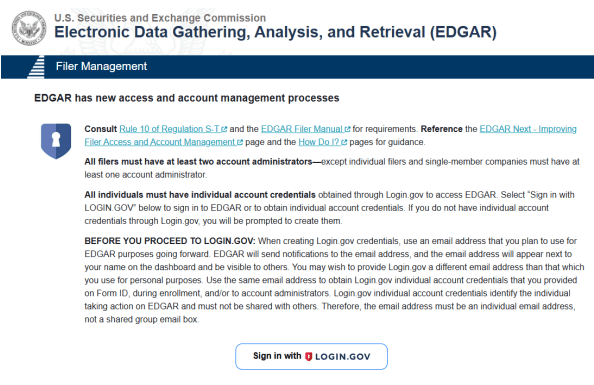
Visit https://www.edgarfiling.sec.gov and click “Sign in using Login.gov.”
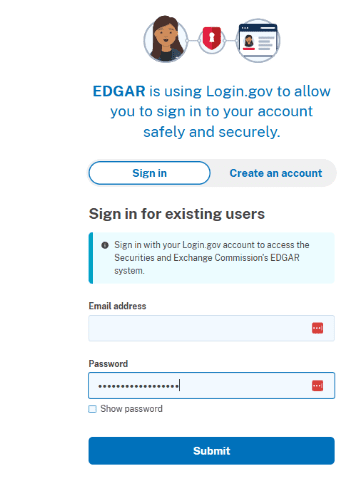
If you don’t yet have a Login.gov account, click “Create an Account” and follow the prompts.
Step 2: Access the Enrollment Portal
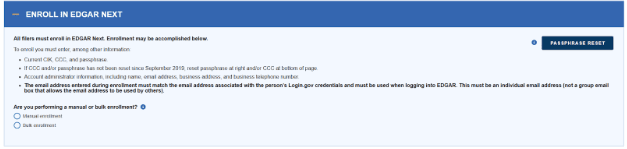
Once logged in, select “Enroll in EDGAR Next” from your dashboard options.
Step 3: Enter Your CIK and Current Passphrase
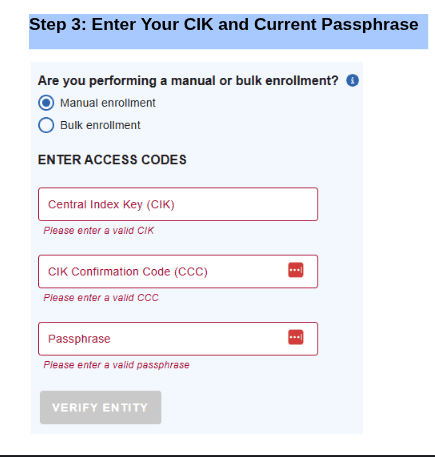
You’ll be prompted to enter your CIK and passphrase (8 characters, including at least 1 number and 1 special character). Please note: the passphrase will be used only for enrollment in EDGAR Next until Dec 19, 2025.
If you’ve forgotten your passphrase, continue to Step 6 below.
Step 4: Enter Contact Details & EDGAR POC Email

Enter your company’s email (POC) and contact information.
This email will be used to receive reset tokens and authorization links in the future.
Enter the second administrator’s email and contact information. Colonial will serve as the second administrator.
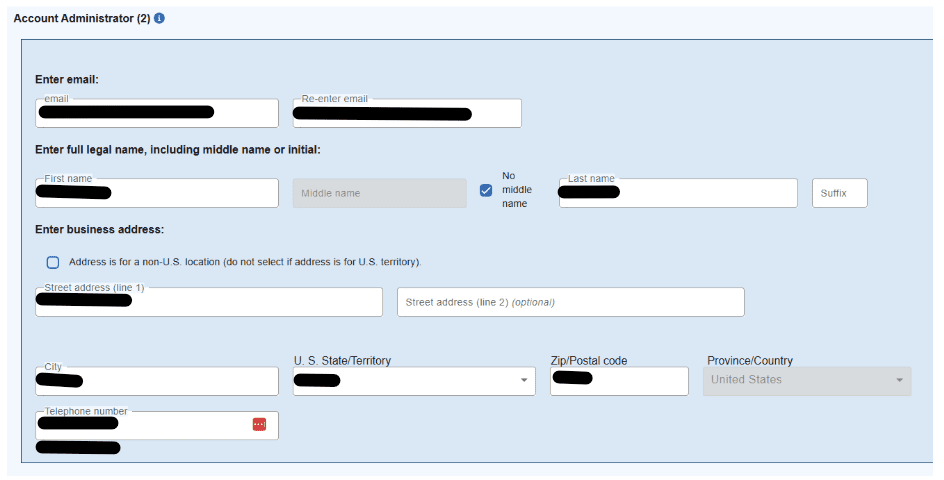

Determine what date you would like to confirm annually that the information entered here hasn’t changed. Also, you will choose to Delegate filing authority to a filing agent.
Step 5: Obtain New CCC and Password
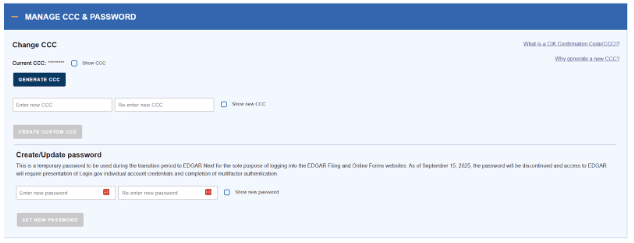
You’ll be able to create a new CCC (8 characters minimum, with a number and special character) and password (12 characters, with a number and special character).
The system is case-sensitive. Avoid confusing characters like “1” and “l”.
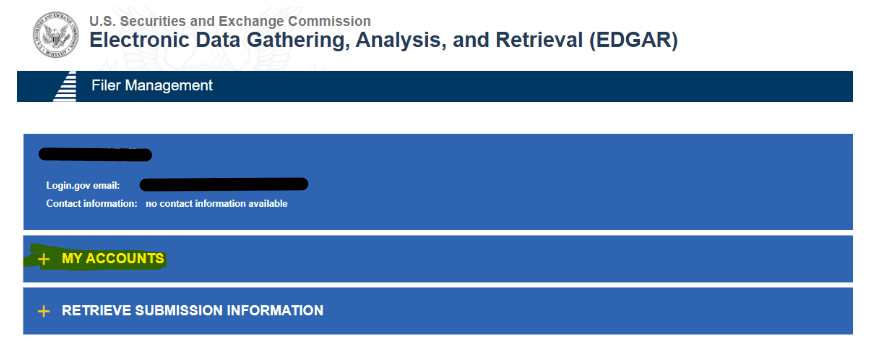
To do so, under “+ My Accounts”, select the company name. Navigate to “+ Manage CCC and Password”.

Alternatively, the current CCC is visible in the “Account Details” block under “+ My Accounts”.
Save your new CCC and password securely.
Step 6: Resetting Forgotten Passphrase (Used Only for Enrollment in EDGAR Next Until Dec 19, 2025).

Once you have the token from the email, enter it under Reset Passphrase. For the Passphrase, you will establish what you would like the passphrase to be (8 characters, including number + special character).

Once you have reset the passphrase, return to Step 2: Access the Enrollment Portal, above.
Step 7: Final Confirmation
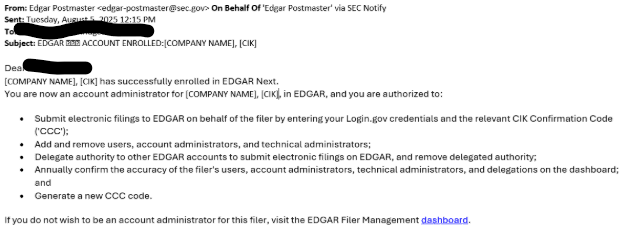
Once submitted, a confirmation email will be sent.
You’re now enrolled and ready for EDGAR Next filing.
Once enrolled, in order to delegate filing authority to Colonial, you will need to accept the invitation to be an account admin – see instructions for Delegating Filing Authority.
Delegating Filing Authority
A minimum of two Account Administrators need to be established in order to delegate filing authority to a Filing Agent. Important to note: Filings CANNOT be submitted without a delegated filing authority.
There are three ways that an Account Admin is established.
- Form ID submission
- Manual Enrollment (see Step 3: Enter Your CIK and Current Passphrase, above)
- Once enrolled, Account Admins can be created under “+Manage Individuals” on the dashboard (see “If Colonial is not one of the Account Administrators” below).
———————————–
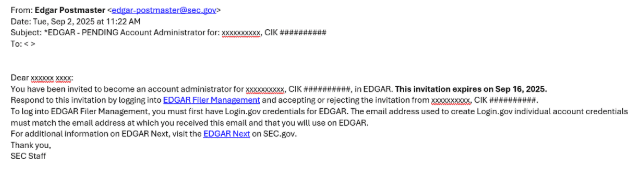

If Colonial is not one of the Account Administrators
You can add Colonial if we are not one of the Account Admins – typically this happens if someone other than Colonial enrolled you. This allows us to help manage your codes and delegate filing authority.
- To add us, once logged in, select your company name under “+My Accounts”. Then select “+Manage Individuals”. Select “Add Individual”.

- Please enter the information as follows:
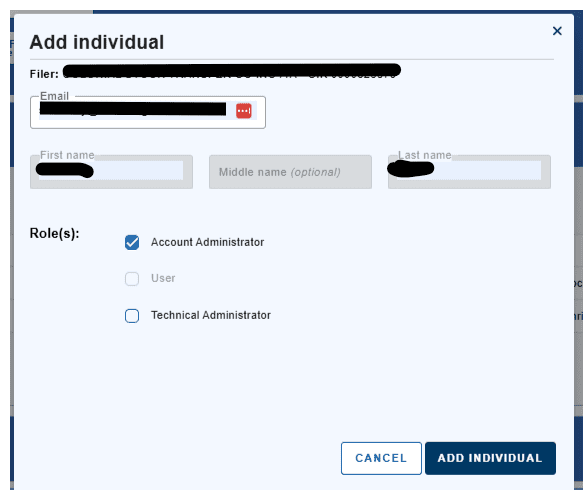
- We will receive the invitation email to be an Account Admin and once accepted, we can delegate filing authority to Colonial.
EDGAR Code Management by Enrollment Status
Enrolled Filers (or Filers Who Submitted Form ID After March 24, 2025)
Once enrolled in EDGAR Next, access codes and filer credentials are managed directly through the EDGAR dashboard.
- How to Manage CCC and Password via Dashboard
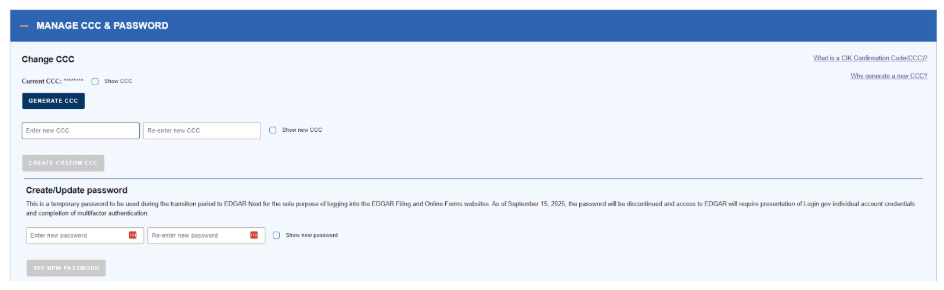
- Log into EDGAR Filer Management using Login.gov.
- Select the Filer Name linked with your CIK.
- Choose “Manage CCC & Password.”
-
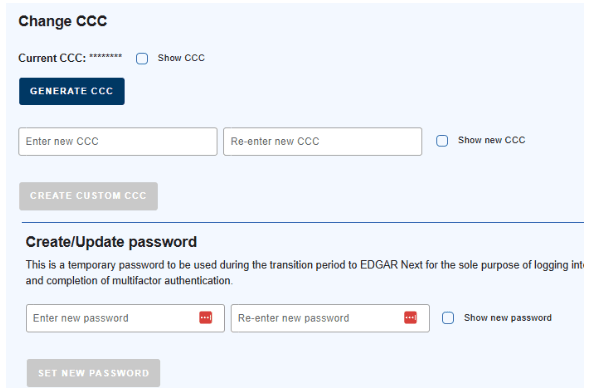
To update CCC:
- Click “Generate CCC” or enter a custom one under “Create Custom CCC.”
-
To change password:
- Use the “Set New Password” fields and confirm.
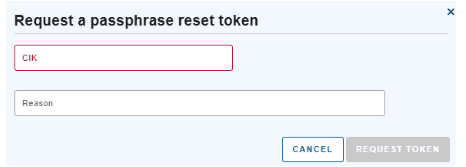
- Reset Passphrase Using Login.gov

- Go to the “Enroll in EDGAR Next” screen.
- Click “Passphrase Reset”.
- Enter your CIK, reason, and request the reset token.
- Use the email token to create a new passphrase (8 characters, including number + special character).
Lost Access or Inaccessible EDGAR POC Email
When a filer loses access to essential credentials and cannot access the EDGAR Point of Contact (POC) email, they may be unable to complete basic resets. In such cases, there are two possible paths forward: update the POC email address or—if that fails—submit a notarized Form ID to regain access.
How to Update the EDGAR POC Email Address
If the filer still knows their CIK, CCC, and password, they can update the POC email manually through the Retrieve/Edit Data function.
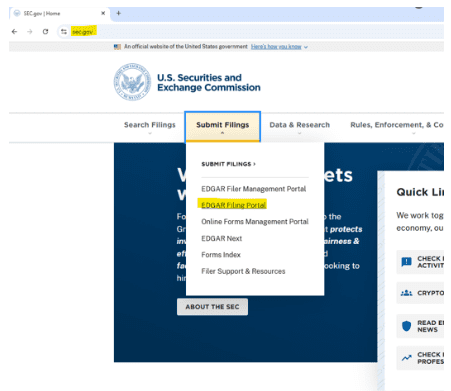

Step-by-step:
- Go to the EDGAR Filing or Online Forms site: sec.gov.
- In the “Submit Filings” tab, select “EDGAR Filing Portal”.
- Enter your CIK and password.
- Select “Retrieve/Edit Data.”
- Input the corresponding CIK and CCC to access the dashboard.
- Scroll to Retrieve Company Information.
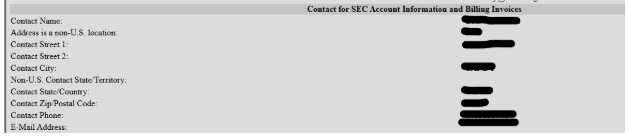
- View or update the EDGAR POC email address.
- Save changes securely.
Filing agents with multiple CIKs can repeat the above process without logging out—simply select “Enter Another CIK/CCC.”
Once enrolled in EDGAR Next, updates to POC email will be made directly through the EDGAR Filer Management dashboard by the account administrator.
When to Submit a Notarized Form ID Again
If none of the recovery options work (e.g., CIK is unknown, credentials are lost, or POC email access is permanently unavailable), filers must submit a signed and notarized Form ID to reestablish access to their EDGAR account.
Submit Form ID ONLY if:
- You cannot reset your CCC or password after attempting token-based recovery
- You no longer have access to the POC email
- You’ve been instructed to do so by SEC Filer Support
How to Prepare and Submit Form ID
To complete the process:
-
Visit the SEC’s Form ID page:
How Do I Prepare and Submit My Form ID - Download the Form ID PDF, fill it out with updated contact and company information.
- Get the form notarized, as required by SEC regulations.
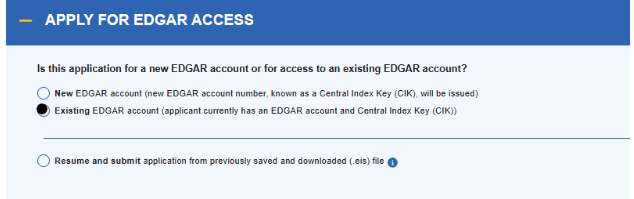
- Submit through the EDGAR Filer Management website under “Apply for EDGAR Access > Existing EDGAR Account”.
Note: Average SEC processing time varies. Always check the current Form ID processing estimates listed on the submission portal and allow several business days for approval.
Best Practices for Maintaining EDGAR Credentials
Maintaining EDGAR credentials is critical to avoid access issues, missed filing deadlines, or compliance setbacks. Whether you’re a filing agent, issuer, or compliance officer, implementing the following practices will help ensure your EDGAR account remains secure and functional—especially during the transition to EDGAR Next.
Credential Management Checklist:
- Update Access Codes Periodically
Rotate your CCC, password, and other access codes regularly—especially after staff
changes or suspected compromise. - Retain Your Passphrase Until December 19, 2025
While passphrases will no longer be required after December 2025, you must retain and
use them during EDGAR Next enrollment. - Apply Role-Based Access Controls (RBAC)
Only authorized personnel should access the EDGAR Filer Management dashboard.
Assign access based on roles (e.g., primary filer, reviewer, administrator) to reduce risk. - Document Codes in a Secure Repository
As EDGAR transitions to Login.gov, ensure that individuals accessing the system have unique, authenticated Login.gov accounts—preferably with multi-factor authentication (MFA) enabled. - Use Login.gov with Secure Authentication
Store all credentials (CIK, CCC, passphrase, password, PMAC) in an encrypted internal
system or credential manager with limited access. - Track Expiration Dates
Passwords still expire and should be checked regularly within the EDGAR filing websites to avoid unplanned lockouts. The expiration date appears in red on the login screen after signing in. - Limit Use of Easily Confused Characters in CCCs
Avoid using characters like the number “1” and lowercase “l” or the number “0” and capital “O” when customizing a CCC. These can lead to frequent entry errors.
How Colonial Filings Supports Clients
Navigating EDGAR access codes, account enrollment, and regulatory transitions can be complex—especially with the rollout of EDGAR Next. Colonial Filings offers personalized assistance and technical expertise to help filers meet SEC compliance requirements with confidence
Expert Support for Every Step:
- EDGAR Next Enrollment Assistance
Colonial helps filers enroll in EDGAR Next using their Login.gov credentials, ensuring that all required steps are completed accurately and securely. From initial login setup to final confirmation, our team walks clients through each phase of the process. - Form ID Preparation and Submission
Whether you’re registering a new EDGAR account or regaining access to an existing one, Colonial prepares and submits your Form ID swiftly—minimizing downtime and reducing filing delays. - Resetting and Securing EDGAR Access Codes
Lost your CCC, passphrase, or password? We guide clients through the reset token process, coordinate with SEC requirements, and assist in updating credentials safely and efficiently. - Filer Management Dashboard Walk‑Throughs
Our experienced agents provide hands-on training with the EDGAR Filer Management dashboard, helping clients manage their CCC, password, EDGAR POC email, and user permissions with ease. - Compliance Best Practices
From password expiration alerts to secure credential handling, we advise clients on how to maintain EDGAR code hygiene, reducing risks and avoiding submission rejections. - Same-Day Support & Secure Handling
With a responsive U.S.-based team and nearly two decades of EDGAR filing experience, Colonial delivers same-day turnaround and secure credential management that clients can trust.
Looking Ahead
As the SEC transitions to the new EDGAR Next system, timely action is essential. Filers must enroll by September 12, 2025, to avoid disruptions in their ability to submit filings. After that date, access will be restricted until enrollment is complete—and by December 19, 2025, legacy credentials will no longer be supported at all.
Navigating this transition doesn’t have to be difficult. Colonial Filings provides expert guidance and end-to-end support for EDGAR Next onboarding, Form ID preparation and submission, access code recovery, and ongoing compliance with SEC filing deadlines.
Have questions or need assistance enrolling?
Contact Colonial Filings today and let our experienced team help you maintain uninterrupted access and peace of mind through every step of your SEC filing journey.
Frequently Asked Questions (FAQs)
What is the Central Index Key (CIK)?
The CIK is a unique 10-digit number assigned by the SEC to identify each filer, including individuals and companies. It is permanent and publicly accessible.
What happens if I miss the EDGAR Next enrollment deadline?
If you do not enroll in EDGAR Next by September 15, 2025, you will be unable to access or submit filings through the EDGAR system. From September 16 to December 19, 2025, enrollment will still be open, but you will not be able to file until enrollment is completed. After December 19, legacy credentials (password, PMAC, passphrase) will no longer work.
How does EDGAR Next impact filing agents?
Under EDGAR Next, filing agents must use their own Login.gov credentials to access the system. They will also need to be explicitly authorized by the filer as a delegated entity within the Filer Management Dashboard in order to make filings on the filer’s behalf.
Can I have multiple users access the same filer account?
Yes, multiple users can access the same filer account in EDGAR Next. Each user must enroll via Login.gov and be assigned specific roles (such as account administrator or delegated filer) within the EDGAR Filer Management system.
How do I reset my CCC or password if I’m not enrolled?
What is the difference between a CCC and a password?
The CCC (CIK Confirmation Code) is used along with the CIK to authenticate filings, while the password is used to log into the EDGAR system itself. Both must follow strict formatting guidelines and be kept secure.
How do I know if my codes are current?
Codes created before September 2019 are considered outdated and must be updated before enrollment. You can confirm code status by accessing the Filer Management Dashboard or requesting a reset token.
Do I need a new Form ID for EDGAR Next?
No, if you already have an EDGAR account, you do not need to submit a new Form ID to enroll in EDGAR Next—unless your access codes are lost and cannot be recovered through the token process.
Can Colonial Filings help with EDGAR Next?
Yes, Colonial Filings offers support for EDGAR Next enrollment, code recovery, Form ID preparation, and complete filer management dashboard walk-throughs to ensure a smooth transition.
Streamline Your EDGAR Filings
Discover our full range of specialized SEC filing services designed to support EDGAR filers at every stage — from emerging private companies to established publicly-traded corporations.